
Early alpha · macOS, Windows and Linux
See your Git history.
Then change it with confidence.
GitBob is a free Git client: an interactive commit graph, staging with real diffs, drag-and-drop merges, undo, a conflict editor and pull request reviews. Every action runs the Git you already have installed.
Free for macOS, Windows and Linux. Version 0.8 alpha. No account.

Highlights
-
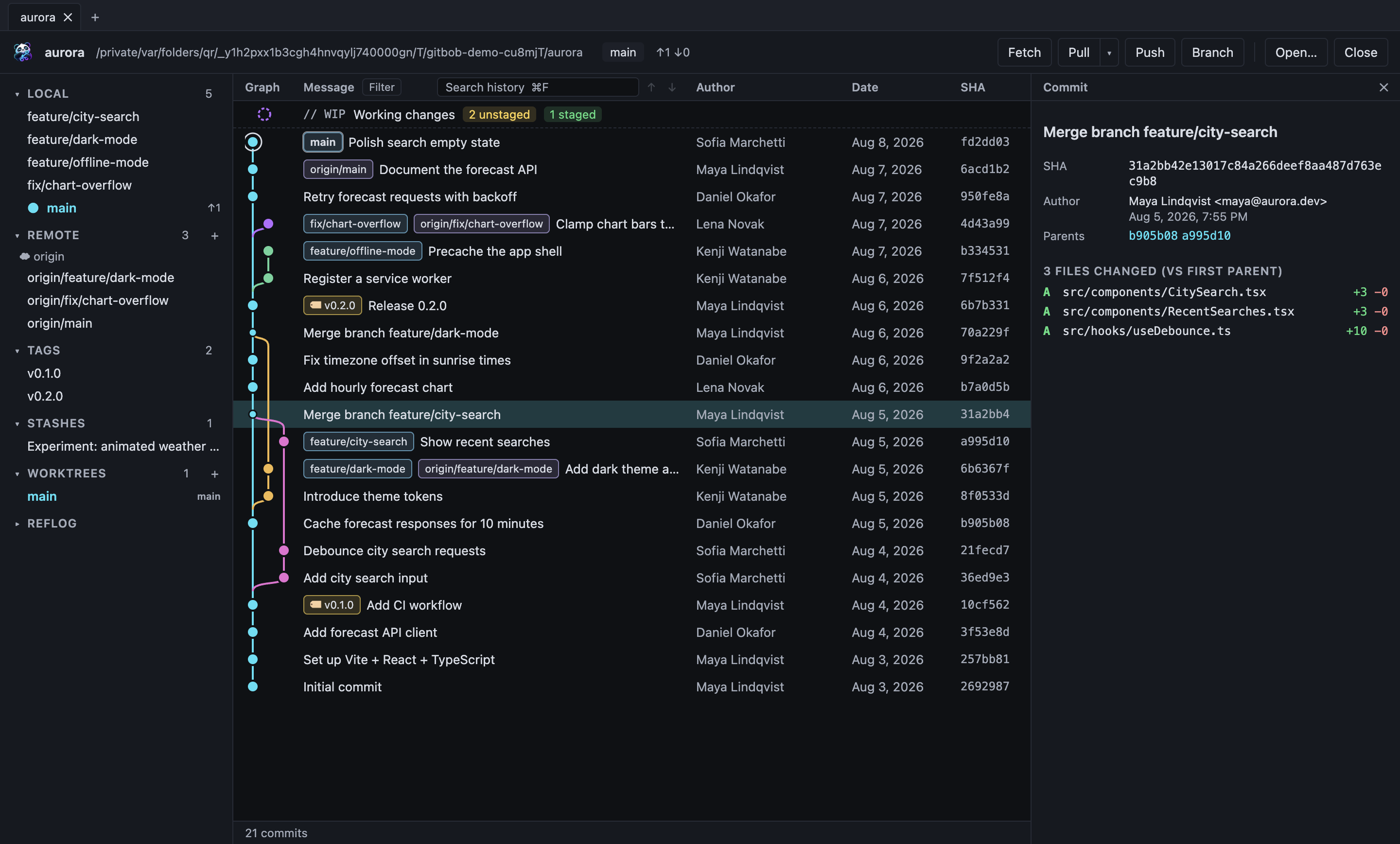
A graph you can read
Every branch, remote, tag and merge, laid out in lanes. Click any commit to inspect it.
-
Your Git, not a copy
GitBob runs the git command on your machine. Nothing is simulated or reimplemented.
-
Careful with your work
Destructive actions ask first. Discarded new files go to the Trash, not into the void.
-
Private by default
No sign-up, no telemetry. It works offline; the network is only used when you fetch, pull or push.
The whole history, in one view
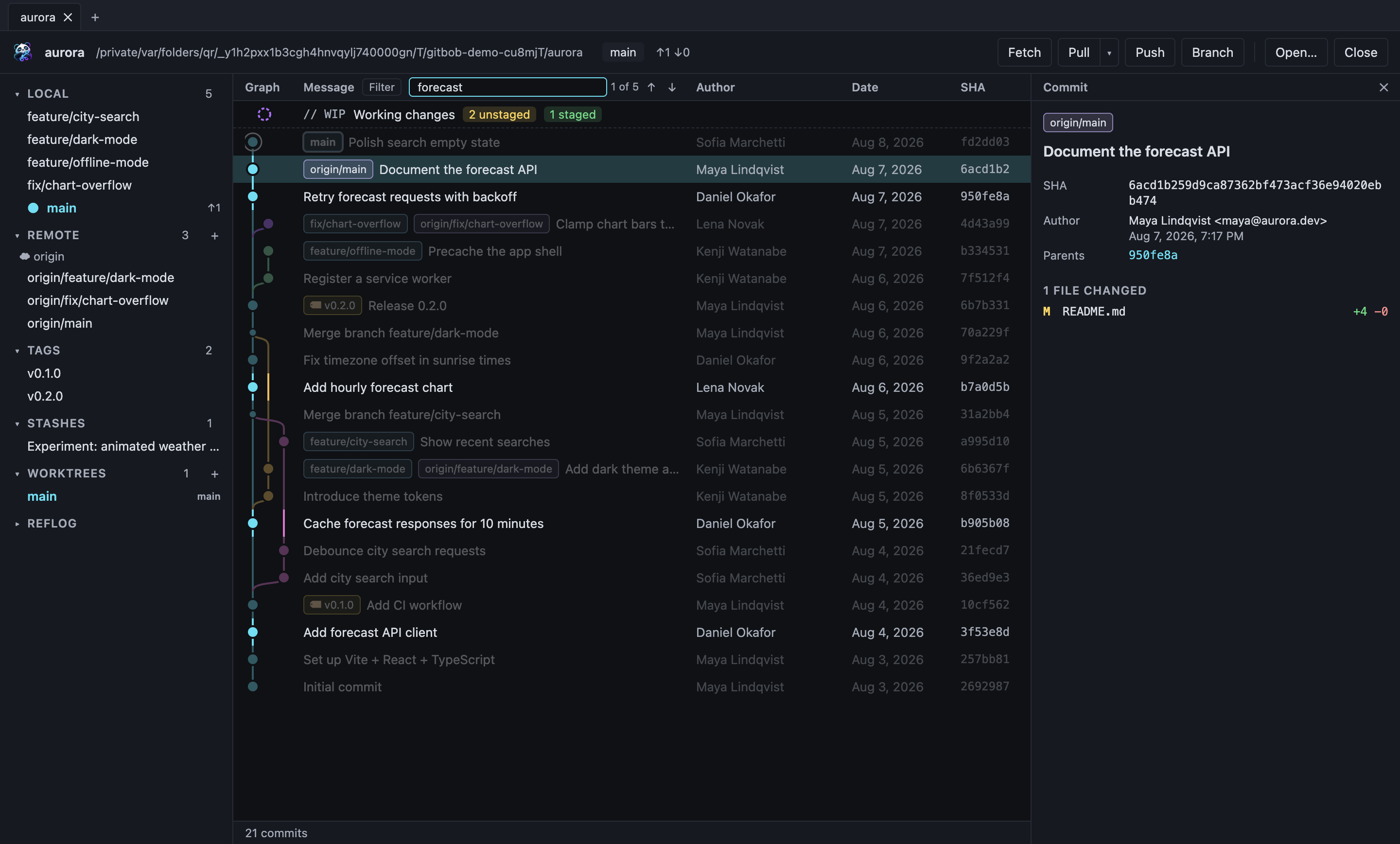
GitBob reads the real commit graph across all your branches, remotes and tags and draws it as lanes, with merges, octopus merges and multiple roots handled correctly.
- Branch labels show where a branch lives: 💻 on your computer, the project icon on the server, one label when they match
- Author pictures on the graph, resizable columns you can hide, and branches you can hide or solo
- Drag the graph column, the sidebar and the details panel to the width you like; GitBob remembers it
- Select several commits (⌘/Ctrl-click or Shift-click) and see all their changes together, even with commits left out between them
- Uncommitted work appears as its own row at the top
- Arrow keys move through commits; clicking a ref in the sidebar jumps to it
- Filter by branch, author, or a file or folder
- Commit details: author, committer, parents, full message and changed files as a list or a folder tree
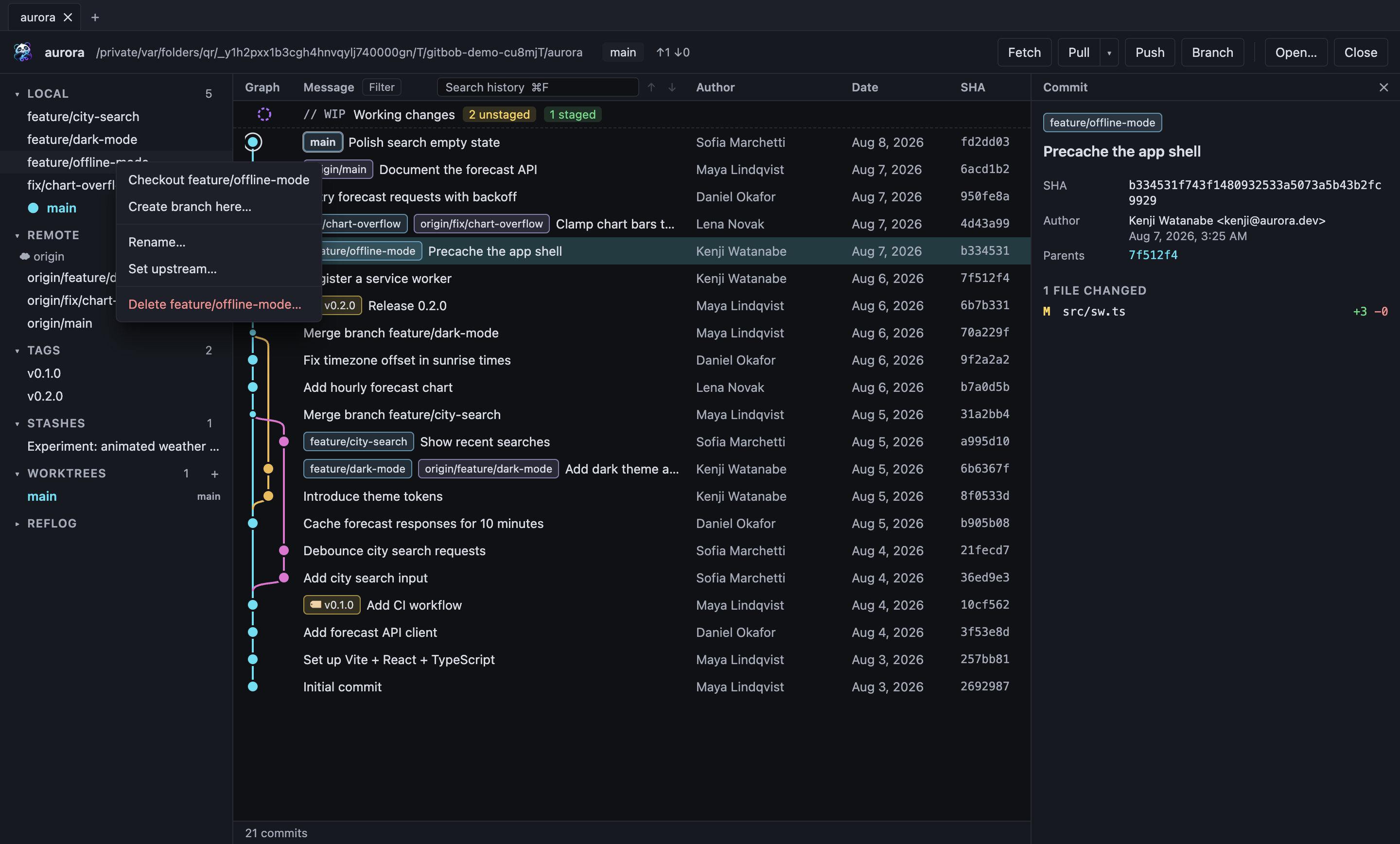
- Open any file in a commit to see its diff
Stage, review, commit
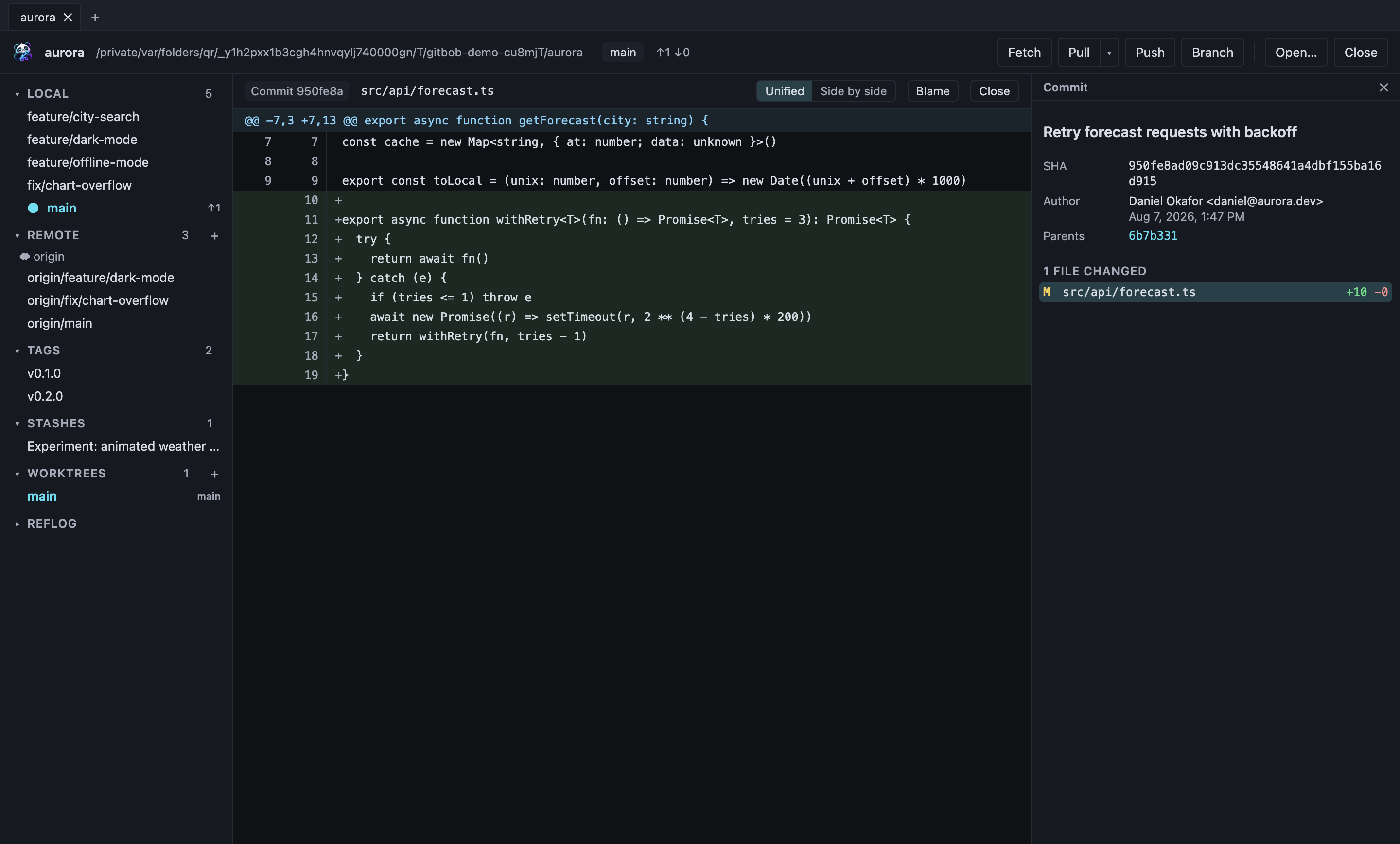
Unstaged and staged files sit side by side. Select one to see exactly what changed before it goes into a commit.
- Stage or unstage single files, or everything at once
- Diffs for modified, staged, new and binary files
- Commit with a summary and description, or amend the last commit
- Drafts kept per repository, commit templates, Conventional Commits type picker and co-author suggestions
- Select several files and commit only those; everything else stays as it was
- Fix a file right in the app and save or stage it; GitBob won't overwrite changes another program made meanwhile
- Failing hooks and a missing Git identity are reported clearly
- Changes made in your editor or terminal show up automatically
Branches and remotes
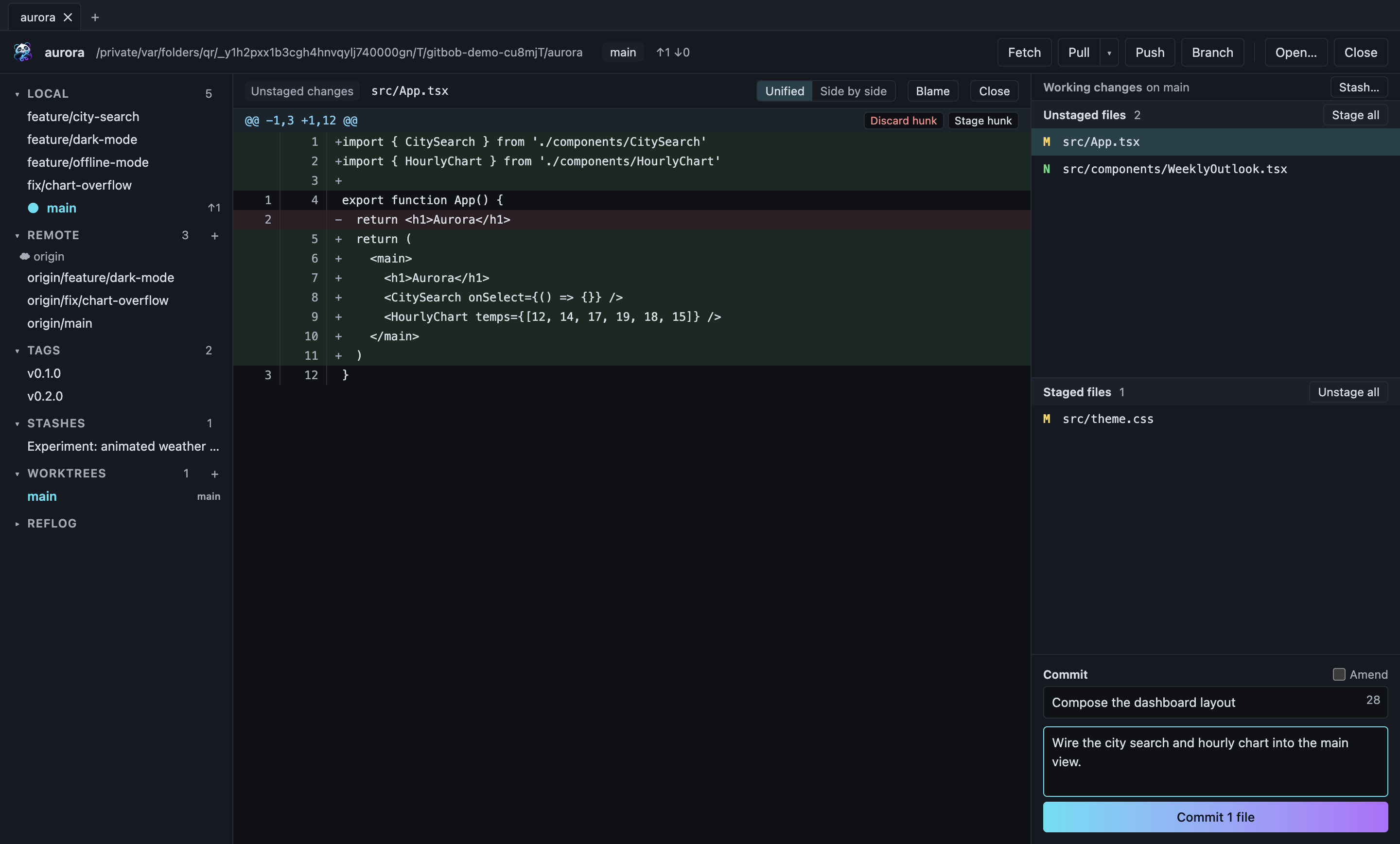
Right-click a branch or commit to do the common things without leaving the graph.
- Create a branch at any commit, check out, rename and delete
- Drag a branch onto yours to merge or rebase it; drag a commit onto it to cherry-pick
- Full right-click menus for commits, local and remote branches: edit messages, drop or move commits, fast-forward, pull or push a branch you're not on, compare, save patches and more
- Check out a remote branch and GitBob creates the tracking branch
- Set upstreams and see how far ahead or behind you are
- Fetch with prune; pull as fast-forward only, merge or rebase
- Push a new branch and its upstream is set for you
- Clone from a URL with progress, or start a new repository
- Several repositories open in tabs, restored next time; switch repository or branch from the toolbar
- Add and remove remotes
- Asks for your password or token when needed, and can remember it in your system keychain
- SSH key passphrases and new-server fingerprints are confirmed in a dialog
- Branches like feature/login are grouped into folders, and remote branches nest under their remote
- Git LFS: see, track and download large files
- Fetch, pull and push show progress and can be cancelled
Pull requests, without the browser
Connect GitHub, GitLab, Bitbucket or Azure DevOps and review work where the code is.
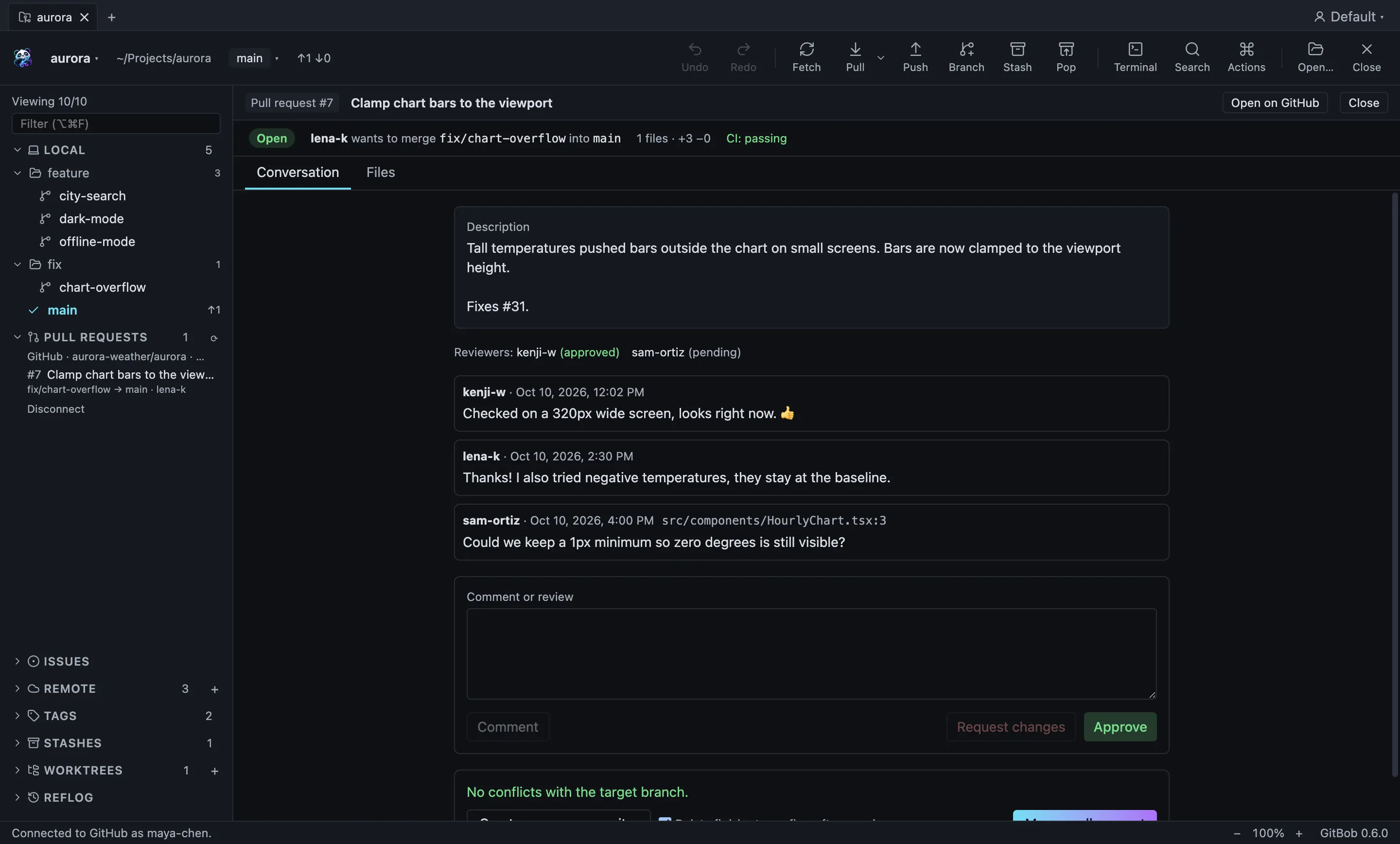
- Read a pull request's description, comments, reviewers and CI status
- See every changed file, and add comments right under a line
- Approve, request changes, and merge, squash or rebase; GitBob refuses if new commits arrived since you looked
- Create pull requests from your branch, and see CI status next to it
- Issues for GitHub, GitLab and Bitbucket in the sidebar
- Sign in with GitHub in one click, and clone from a searchable list of your repositories
Side-by-side diffs and a real conflict editor
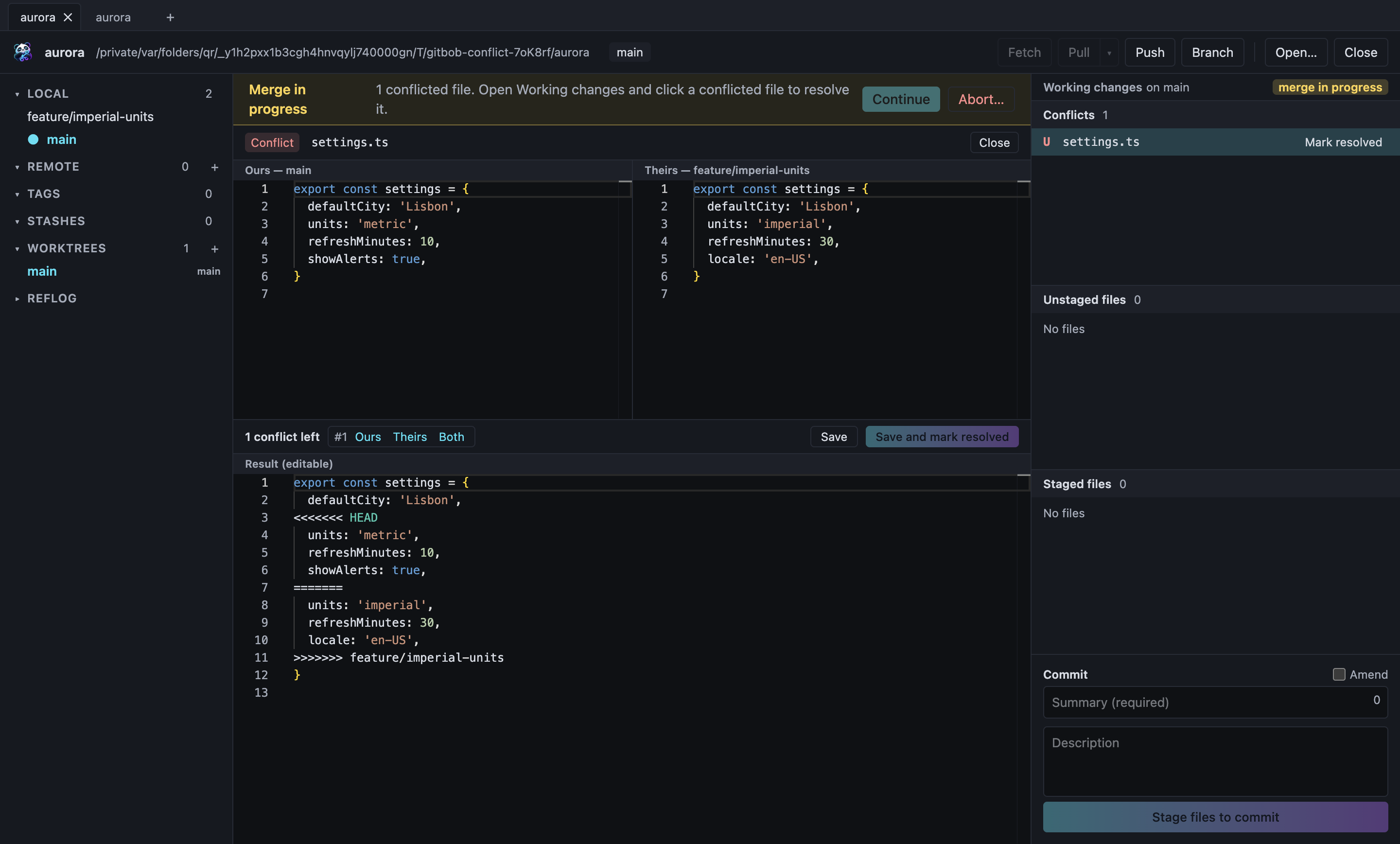
See changes the way you think about them, and get out of merge conflicts calmly.
- Side-by-side diff with syntax highlighting for about 80 languages
- Stage, unstage or discard a single hunk, or just the lines you pick
- Conflict editor: ours and theirs side by side, an editable result below
- Ours, Theirs or Both for each conflict, then save and mark it resolved
- GitBob won't mark a file resolved while conflict markers remain
Undo, stash and tag
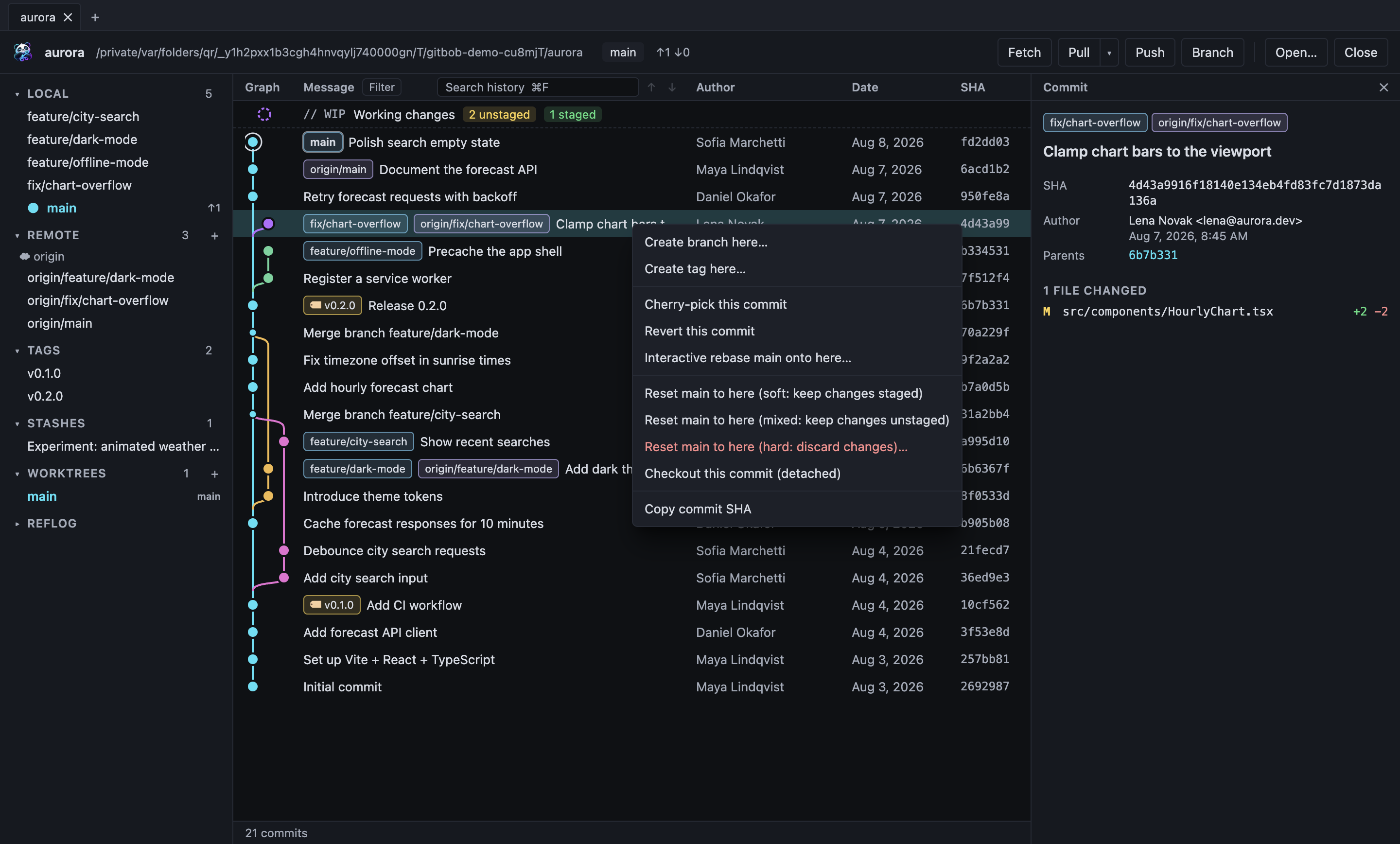
The time-travel tools are one right-click away, and the risky ones look after your work.
- Undo and redo (⌥⌘Z): take back a commit, amend, checkout, branch change, reset, merge, pull or rebase; never at the cost of uncommitted work
- Stash a single file, bring back one file from a stash, or turn a stash into a branch
- Cherry-pick a commit onto your branch, or revert it with a new commit
- Reset soft, mixed or hard; a hard reset asks first and saves your uncommitted work as a backup stash
- Stash half-finished work with a message, then pop or apply it later
- Create annotated or lightweight tags, push and delete them
- A banner offers Continue, Skip or Abort when a merge, rebase, cherry-pick or revert stops on a conflict
Rewrite history, read its story
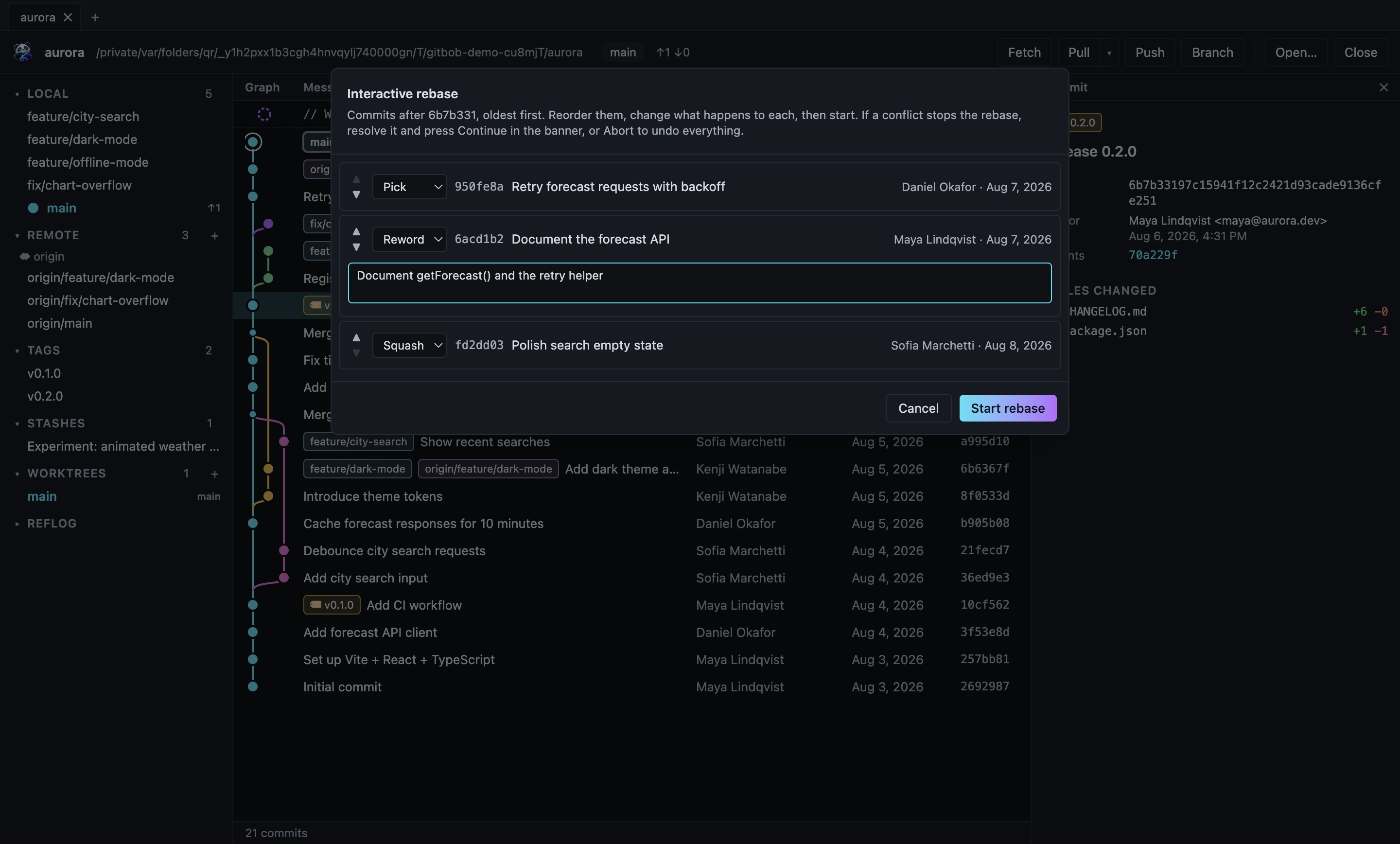
Tidy commits before you share them, and find out why any line looks the way it does.
- Interactive rebase in a dialog: reorder, reword, squash, fixup or drop
- Conflicts during a rebase hand over to Continue, Skip or Abort
- The reflog lists every former state of HEAD; rescue lost work with one right-click
- Blame any file, now or in any commit, and jump to the commit behind a line
- File history: every commit that changed a file, even across renames
- Worktrees, submodules and GPG/SSH signature status
Find anything, light or dark
Search reaches the whole history, not just what is on screen, and the app fits your desktop.
- Search by message, author, committer or commit id with ⌘F
- Matches light up, the rest fades; Enter jumps to the next one
- Light, dark or match-system theme
- Command palette (⌘K), keyboard shortcuts you can rebind, and zoom
- Profiles for work and personal projects, each with its own settings, accounts and Git identity
- Accessibility checked with axe-core in both themes
- Fast on big repositories: on the VS Code repository (192,000 commits), one-click Speed up history opens it in 0.65 seconds
Built on real Git
GitBob doesn't pretend. Each button runs a git command on your repository, with arguments passed directly to the process rather than through a shell. If Git refuses, you see why.
| When you | GitBob runs |
|---|---|
| Pull | git pull --ff-onlyby default, so nothing gets merged by surprise |
| Force push | git push --force-with-leaseafter you confirm; refuses if the remote moved since your last fetch |
| Commit | git commit --file=-your message goes in through standard input, untouched |
| Discard a new file | Move to Trashafter you confirm, so you can still get it back |
| Delete an unmerged branch | git branch -Donly after a second confirmation |
Your data stays yours
There's no account to create and no telemetry in the app. Browsing history, staging and committing all work offline. GitBob only talks to the network when you fetch, pull or push, using your own Git configuration, SSH agent and credential helpers.
A locked-down app
The interface runs in a sandboxed Electron window with context isolation, no Node.js access and a strict content security policy. Every request from the interface to Git is type-checked and limited to repositories you opened.
On the roadmap
Not merged yet. These are planned and not in the app today.
- Signed installers, and automatic updates on macOS
- One-click sign-in for GitLab, Bitbucket and Azure DevOps
- Workspaces: open and fetch groups of repositories together
- Notifications when a pull request is reviewed or CI fails
Get GitBob
Windows
Windows 10/11, 64-bit .exeThese alpha builds aren't signed with a developer certificate yet. On macOS, open GitBob the first time with right-click → Open. On Windows, choose More info → Run anyway. GitBob needs Git installed. On Windows and Linux (AppImage), Settings → About → Check for updates installs new versions for you. Release notes and older versions: GitHub Releases.
Or build it from source
You'll need Git and Node.js 22 or newer.
-
Clone the repository
git clone https://github.com/szabto/gitbob.git cd gitbob -
Install dependencies
npm install -
Start the app
npm run dev
Prefer to read the code first? View GitBob on GitHub. GitBob is early alpha software. It's careful with your work, but keep your usual backups and pushes.